
THE DCC PLATFORM
Route every alert. Confirm every response. Learn from every shift.
This is how Direct Care Connect DCC™ works behind the call button: alert routing by zone and priority, caregiver acknowledgement and two-way voice, and response reporting that shows what happened and when. Wired and wireless equipment connect to the same workflow.
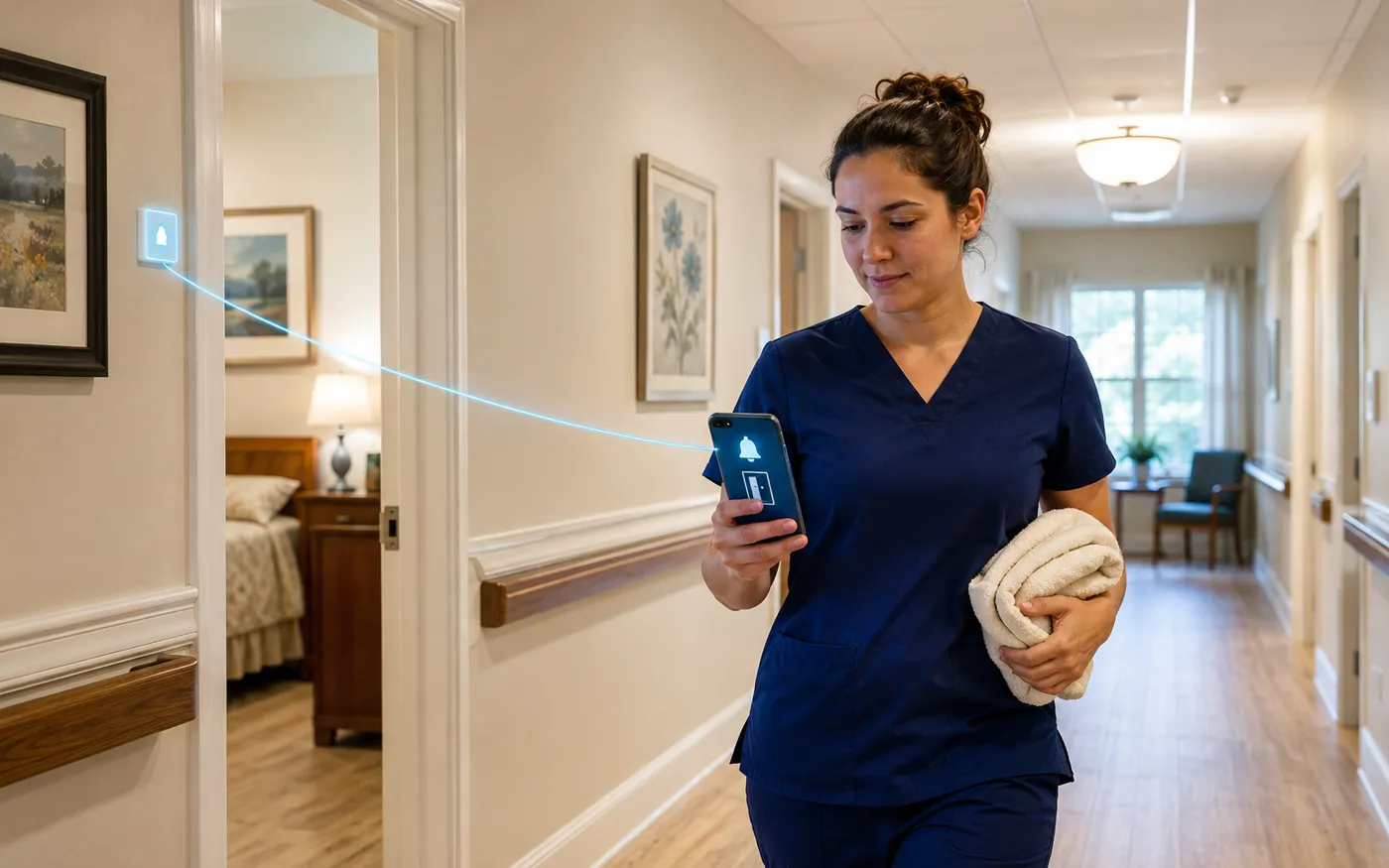
FROM ALERT TO INSIGHT
From the first alert to the care that follows.
Connect each stage of the response, so the team can act in the moment and learn from the record.
- 01
Detect
A resident call, staff request or connected sensor raises an event.
- 02
Route
Priority, work zone and schedule determine who is notified and when to escalate.
- 03
Respond
Caregivers accept the alert and coordinate assistance.
- 04
Record
Capture response timing, recorded care time, care categories and notes.
- 05
Review
Use event history, reports and the AI assistant to spot patterns in seconds.
ALERT ROUTING
Get the right alert to the right team.
Bring nurse call, staff duress, wander events and compatible sensors into a shared workflow, with rules that reflect how your community operates.
Unified alerting
Connect multiple alarm sources to one view. Give staff the event type, assigned location and available resident context they need to respond.
Prioritized response
Assign priorities and escalation paths to different events. Notify additional responders when an alert has not been accepted.
Work zones and shift coverage
Route notifications to caregivers covering the relevant area, with schedules that adjust routing by time of day and day of week.
Location and resident context
Use room, bed and device assignments to identify where help is needed. Supported location wearables and resident photos add context to the alert.
CAREGIVER COMMUNICATION
Know the alert was accepted.
Upgrade the way your team receives and responds to calls. With supported apps and handsets, caregivers can acknowledge an alert so the system records who accepted it and when.
Message sent
A one-way pager delivers the alert without confirming that a caregiver has accepted it.
Received. Accepted. Recorded.
DCC connects alert delivery with a response from a named caregiver. Unaccepted alerts follow your configured escalation path.
DCARE MESSENGER
The response workflow, in your team’s pocket.
Bring active alarms, elapsed times and location details to supported smartphones. Staff sign in, select their working zone and accept a call from the device they carry.
- Act on the alert. Acknowledge the call or use voice callback where supported.
- Ask for backup. Generate a staff assistance request when another colleague is needed.
- Follow through. Record care time, complete the response and review alarm history.
DCare Messenger supports iOS and Android. Next-generation capabilities are available on supported iOS deployments; features vary by app and configuration.
Room 214
Assistance requested
Tap to explore this sample workflow.
NEXT-GENERATION DCARE
A more connected care experience.
A modern mobile experience brings timely alerts, useful context and team coordination closer to the point of care. Designed to help caregivers stay aware and respond with confidence throughout their shift.
Available on supported iOS deployments. Talk with us about the capabilities that fit your community.
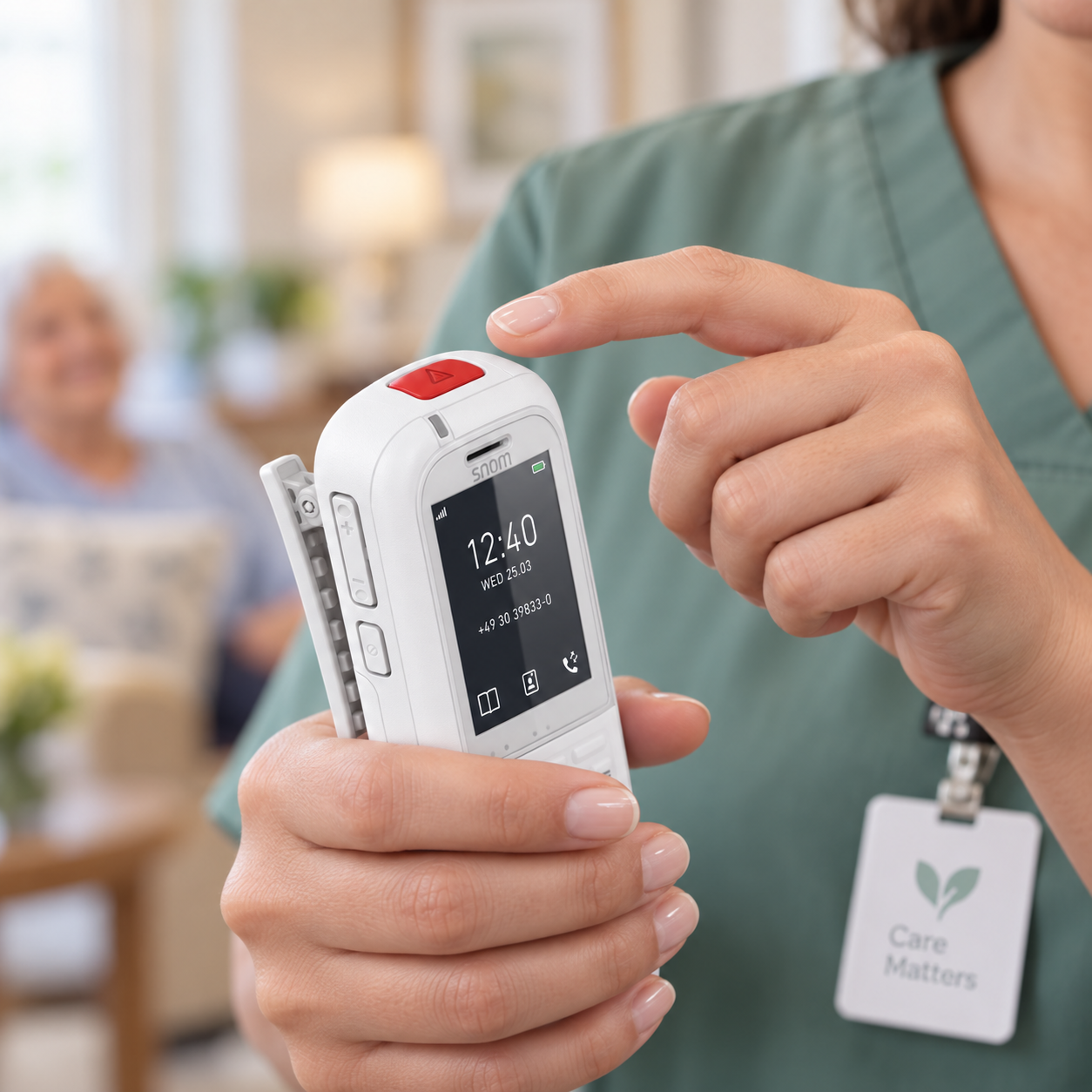
OFFICIAL SNOM INTEGRATION
Rugged handsets. A response you can confirm.
For teams that prefer a dedicated cordless handset, DCC integrates with supported Snom DECT devices. Developed with Snom using its API, the integration brings alarm delivery and acknowledgement directly to the handset.
- Accept from the handset. Receive the alarm and acknowledge it using the handset controls. Rejected or unanswered alerts follow the configured response workflow.
- Coverage built around your building. DECT provides a dedicated wireless path from base stations to handsets, with coverage planned for the areas your staff use.
- Practical on-shift communication. Combine alert handling with supported voice and staff assistance functions, with device and base-station visibility for troubleshooting.
Poltys provides the DCC integration. Smartphones, Snom handsets and their associated endpoint hardware are sourced separately; we do not sell these devices.
VOICE & IP-PBX
Connect the conversation to the call.
An alert tells your team that someone needs help. A brief conversation can help them understand what kind of help is needed. With supported room stations and phones, caregivers can call back to the resident’s room and ask, “How can I help?”
That extra context helps staff prioritize their response and coordinate assistance—especially overnight or when several calls arrive while a smaller team is on duty.
“How can I help?”
“Could you bring me some water?”
Knowing what the resident needs helps the caregiver prepare and coordinate the visit.
“I’m in extreme pain. Please help.”
Hearing the resident’s concern gives staff important context for prioritizing attendance and requesting backup.
Integrated IP-PBX brings unified communications for healthcare into the DCC workflow: staff calling, transfers, paging, intercom and resident telephone service where configured. Nurse call operation remains independent of voice communication.
Explore voice integration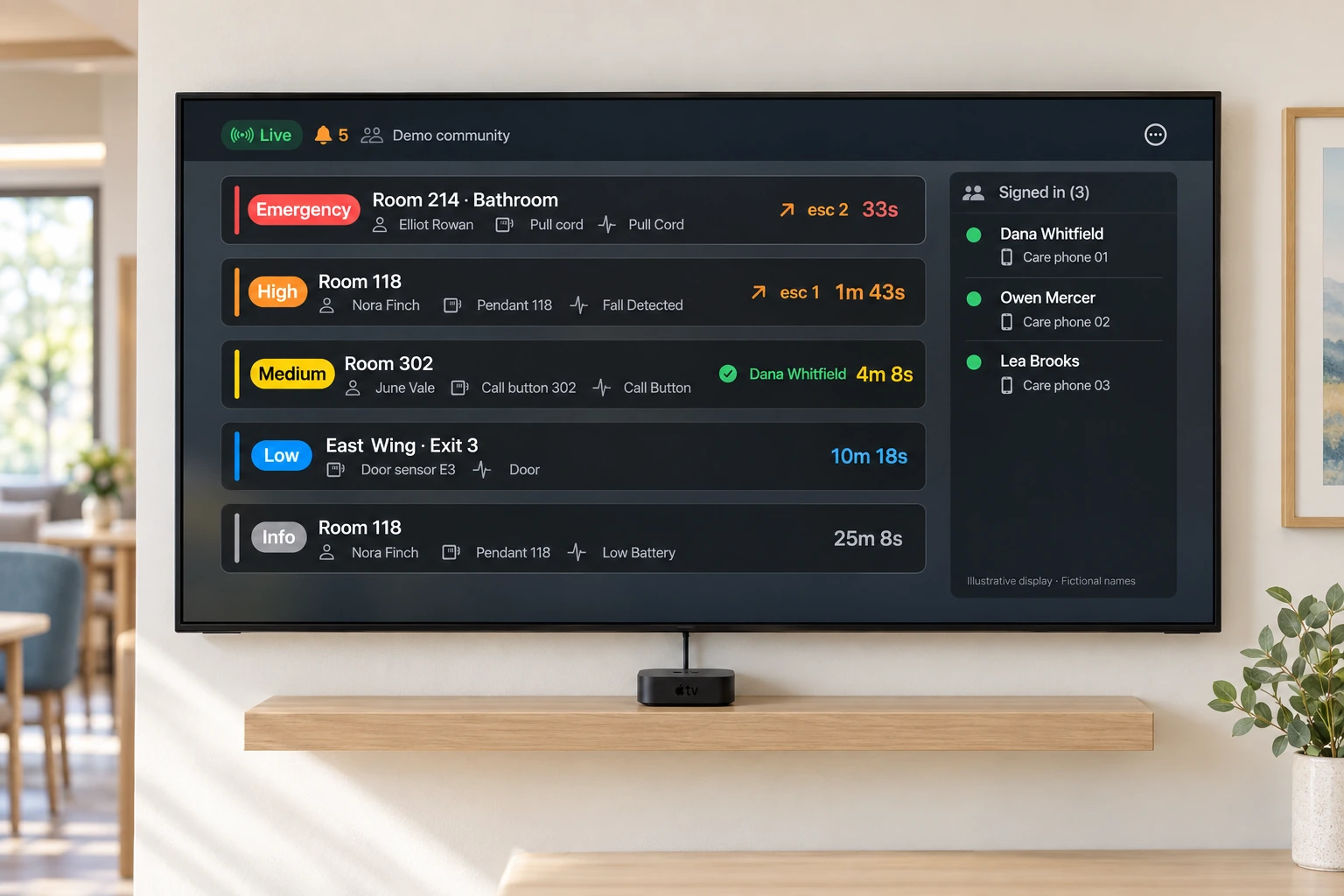
APPLE TV CARE BOARD
A shared view of the shift.
Turn a dedicated TV or display into a care board with Apple TV and the DCC app. Give the nurse station a clear view of open events and the staff and devices signed in.
- Open events at a glance. See event priorities, locations and response status.
- Know who is signed in. View staff names alongside their devices.
- Keep the team informed. Complement individual alerts with a display in a staff workspace.
CARE REPORTING
See response time and the care that follows.
Understand how quickly calls are accepted, how care is recorded and what happened along the way.
RESPONSE TIME
From alarm to acceptance
Review how long it took for a caregiver to accept an alert, alongside delivery attempts and escalation history.
RECORDED CARE TIME
The care that follows
Review the care window recorded through the configured workflow, with care categories and notes that explain the response.
DOCUMENT THE CARE
Care categories and notes
Configure categories around your workflows, from assistance and room cleaning to falls or false alarms. Add notes to explain the response.
FOLLOW THE EVENT
A detailed event history
Trace when an alarm opened, where it was sent, each escalation, who accepted it and how it closed.
SHARE THE INSIGHT
Reports with useful context
Review response and care metrics by resident, device, alarm type or staff member. Export reports or schedule automatic email delivery to support regular review.
DASHBOARDS FOR EVERY ROLE
The right view for everyone who keeps residents safe.
Care managers, maintenance teams and system administrators each get a dashboard built around the questions they ask every day: clear at a glance, and detailed enough to act on.
FOR CARE MANAGERS
Find gaps in care before they happen.
See how quickly calls are answered and cleared, and when your community is busiest.
- Spot slow responses earlyResponse and clear times against your target, compared with the previous period.
- Staff for the peaksSee which days and hours bring the most calls, so shifts match the need.
- Report with confidenceEvery call is time-stamped from alarm to clearance, ready for incident reviews and quality meetings.
Busiest 10 AM–noon and 8–10 PM. Plan staffing around the peaks.
FOR MAINTENANCE TEAMS
Fix it before it fails.
Every pendant, pull cord and station reports in, so you know what needs attention without walking the halls.
- See every device at a glanceLow batteries, missed check-ins and offline devices, worst first.
- Stay ahead of testingKnow which devices have been verified and which are due, ready for inspections.
- Spend less time searchingGo straight to the device that needs you, not room by room.
412 of 418 OK
- Critical low battery2
- Intermittent connectivity4
- OK412
25 devices are due for testing
- Verified by a real alarm78%
- Tested by staff16%
- Due for testing6%
FOR IT AND SYSTEM ADMINS
Know the system is healthy, right now.
Connections, servers, receivers and devices on one screen, with issues linked on a single timeline.
- One health checkClear pass or fail on the checks that matter, updated live.
- Find the cause fasterRelated events are lined up in time, so one dropped receiver doesn’t look like ten failed devices.
- Oversee from anywhereCheck system health from any browser, without driving to site.
Mon 2:11 PM: 3 devices on one receiver went offline within a minute. The network stayed up.
Illustrative examples; names and figures are fictional. Dashboards shown are simplified.
Live dashboards
Current operational visibility.
Exported reports
Data to share and explore.
Scheduled email
Regular reports delivered automatically.
ACTIVITY & WELLNESS INSIGHTS
Understand changes in daily routines.
Add context between calls with presence, daily activity and sleep information from compatible contactless sensors.
Presence and daily activity
Review sensor information about room presence and daily activity to help understand how a resident’s routine changes over time.
Sleep and overnight patterns
Explore nightly sleep summaries and movement timelines alongside recorded events, giving care teams more context for follow-up.
AI-assisted analysis
Use AI assistance to explore available activity and care information. Bring those findings into the team’s review alongside their observations.
COMMUNITY OVERSIGHT
Manage one community or many.
Give community leaders, regional teams and authorized dealers access to the sites they support through one account. Review activity across communities and manage settings remotely.
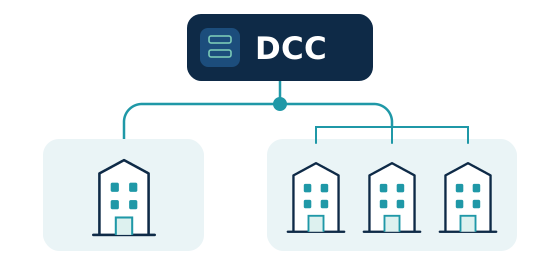
Remote oversight
Access live alarm views, reporting and configuration through the cloud dashboard when connectivity is available.
Roles that fit your organization
Control who can view information and manage settings at the site or organization level.
Device readiness and maintenance
Review supported device battery levels, connection health, tamper conditions and test records to identify equipment needing attention.
Everyday administration
Manage residents, staff, rooms and device assignments through guided workflows, with a record of configuration changes.
RELIABILITY & SECURITY
Local response. Connected oversight.
The on-site system handles alarm routing and escalation. The cloud brings remote access, management and reporting.
Local response
During an internet outage, alarm routing, escalation and supported local alert delivery continue while the local network and equipment remain operational. Local acceptance, completion and push-to-talk can continue too.
Cloud synchronization
Cloud access, remote configuration and new reporting data depend on connectivity. Queued history uploads and configuration updates synchronize when the connection returns.
Access & audit trails
Individual accounts, multifactor authentication, role-based access and encryption protect information. Audit trails record access, configuration changes and AI conversations.
INTEGRATIONS & DEPLOYMENT
Build on what you have.
Connect compatible nurse call equipment, sensors and communication tools. Poltys Canada helps communities and dealers identify a practical path from the existing system to the capabilities they need.
Support wired and wireless call points, Inovonics EchoStream equipment, compatible legacy nurse call systems, door alarms and supported communication devices. Integration options depend on the equipment and interfaces available at your site.
Full system installation
For new buildings or existing communities deploying a complete DCC system: server, software, wired or wireless call points and caregiver communication devices.
System upgrade
Add the DCC server to the nurse call system already in place. DCC is compatible with more than 25 existing nurse call systems, so suitable equipment can stay where it is while alert routing, caregiver communication, reporting and integrations are added.
Server takeover
Take over a competitor’s compatible Inovonics EchoStream wireless nurse call system. Replace its server with DCC and retain suitable installed transmitters and pendants, following a compatibility review.
Screens, dashboards and conversations on this page are illustrative examples with fictional names and sample data, not live systems. Available features, views and insights depend on the connected equipment, integrations and configuration. Recorded care time reflects the configured workflow, and voice call-back adds context but does not replace an in-person response.
SEE DCC AT WORK
Bring your workflows. Explore the possibilities.
Show us your current system and care priorities. We’ll walk through the capabilities, integrations and deployment options that fit your community.